
PrestaShop gives online store owners useful tools to manage products, categories, and website content. However, having an online store does not guarantee strong search engine rankings. Your website may still struggle to attract organic traffic because of technical errors, duplicate pages, weak product descriptions, or poor internal links.
Good SEO in PrestaShop requires more than adding keywords to product titles. Search engines need to discover your important pages, understand their content, and identify which URLs should appear in search results. Customers also need a fast, helpful, and easy shopping experience.
In this guide, we will explore eight common PrestaShop SEO problems that can affect your store’s visibility. You will learn why these issues happen, how they affect search performance, and what you can do to fix them. We will also cover PrestaShop 9 improvements, SEO modules, website migrations, and a practical audit checklist.
1. Duplicate Content and Incorrect Canonical URLs
Duplicate content is a common technical SEO issue for ecommerce websites. It happens when the same or very similar content is available through multiple URLs.
In PrestaShop, this can happen because of product combinations, URL parameters, category paths, sorting options, and filters. For example, the same product may be accessible through different category paths or URL variations.
Product variations can create additional challenges. A product may have different sizes, colors, or materials. If these variations generate multiple URLs without a clear structure, search engines may struggle to understand how the pages relate to each other.
This does not mean every similar page automatically causes a ranking penalty. The main concern is whether search engines can identify the preferred page and understand which version provides unique value.
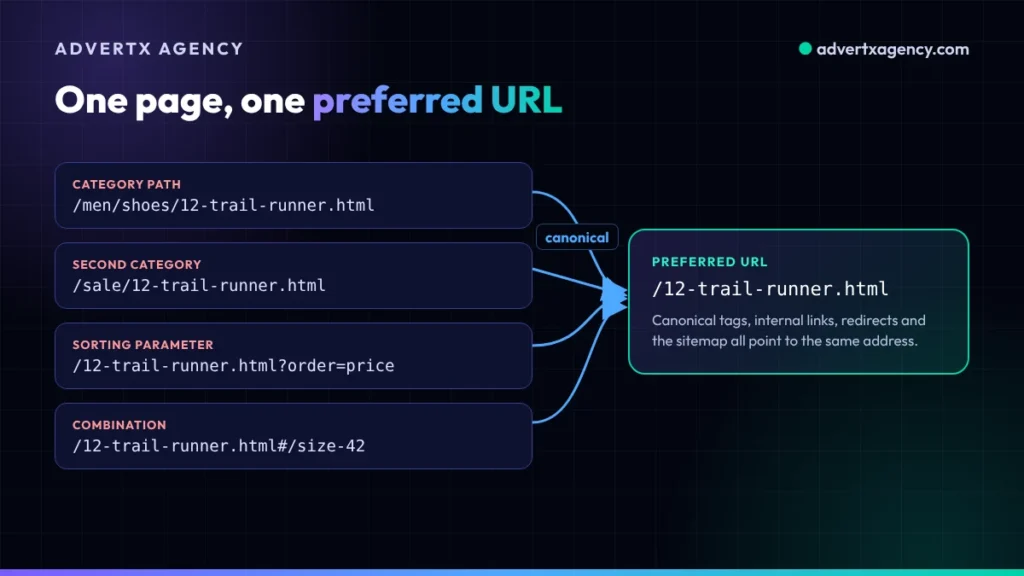
How to Fix Duplicate Content?
Start by reviewing the URLs generated for your products and categories. Identify pages that show the same content through different addresses.
Follow these steps:
- Choose a preferred URL for each important product and category page.
- Add the correct canonical tag to duplicate or closely related URL versions.
- Keep internal links consistent with the preferred URLs.
- Include preferred, indexable URLs in your XML sitemap.
- Avoid creating unnecessary URL variations for the same content.
- Review product combinations and decide whether they need separate indexable pages.
A canonical tag tells search engines which URL you prefer to represent a page or a group of similar pages. It is a signal rather than an absolute instruction, so your internal links, redirects, and sitemap should support the same URL.
For product variations, consider whether each version has enough unique information and search value to deserve its own page. If variations use separate URLs, configure their canonical and variant relationships carefully.
2. Faceted Navigation Creating Too Many URLs
Product filters make shopping easier. Customers can use them to find products by size, color, price, brand, material, and other features.
However, filters can create many different URLs. Each combination may generate another page that search engines can discover.
For example, a clothing store might create separate filtered URLs for black shirts, large shirts, discounted shirts, and black shirts in a large size. Many of these pages may display almost identical products.
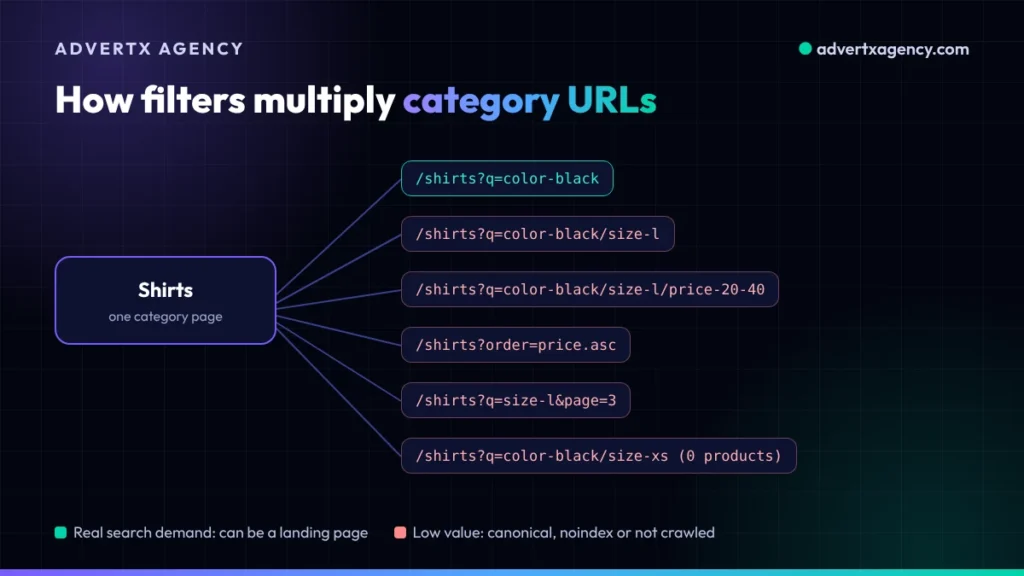
This can create a crawl management problem. Search engines may spend time visiting filtered URLs instead of discovering important products and category pages.
How to Manage Filter URLs
First, identify which filtered pages have genuine search value. Some filter combinations may target useful search queries and deserve dedicated landing pages. Others may offer little unique value and should not be treated as separate search landing pages.
You can improve faceted navigation by:
- Reviewing the URL patterns generated by product filters.
- Identifying combinations that create duplicate or low-value pages.
- Deciding which filtered pages should be indexable.
- Using appropriate canonical or noindex signals where needed.
- Controlling crawling of unnecessary URL patterns.
- Returning a proper not found response for filter combinations with no results.
Be careful when editing robots.txt. Blocking a URL from crawling does not automatically remove an already indexed page from search results. Google may also need access to a page to see a noindex directive. Plan crawling and indexing signals together.
Do Not Ignore Pagination
Category pages often display products across multiple pages. Search engines need a way to discover products beyond the first page.
Use crawlable links between paginated pages. Give each page in a sequence its own accessible URL. Avoid treating every paginated page as a duplicate of the first page.
Also review sorting and filtering parameters. These URL variations should not create unnecessary indexable pages.
A well-managed filter and pagination system helps customers browse products while making your store easier for search engines to crawl.
3. Important Pages Blocked or Not Indexed
A page cannot receive organic search traffic if it is not available for indexing. Store owners sometimes focus on product descriptions and keywords but overlook technical settings that prevent search engines from accessing important pages.
PrestaShop stores may experience indexing problems because of incorrect robots.txt rules, noindex directives, broken pages, weak internal linking, or server errors.
For example, a product category may be blocked accidentally. A product page may have a noindex tag after a development change. Search engines may also struggle to discover pages that have no internal links pointing to them.
How to Fix Indexing Problems
Start by checking your important URLs in Google Search Console. The URL Inspection tool can help you understand whether a page is indexed and identify reported indexing issues.
Next, review these areas:
- Check robots.txt to make sure important product and category pages are not blocked.
- Review meta robots tags and remove accidental noindex directives from pages that should appear in search.
- Check that important pages return a successful HTTP status code.
- Confirm that your XML sitemap contains the correct URLs.
- Add internal links to important products and categories.
- Fix server errors and redirect problems that prevent page access.
- Review canonical tags to make sure they do not point to unrelated or incorrect pages.
Your sitemap helps search engines discover URLs, but it does not guarantee indexing. Every important page should also be accessible through useful website navigation and internal links.
Do not try to index every URL on your store. Cart pages, account pages, internal search results, and low-value filter combinations usually do not need to appear in search results. Focus on pages that provide value to potential customers.
4. Poor Product and Category Page Content
Product and category pages are among the most valuable pages on an ecommerce website. They help customers understand what you sell and give search engines information about your products.
However, many stores use short descriptions, copied manufacturer content, or nearly identical text across multiple products. Some category pages contain only product listings without any useful introduction.
This makes it difficult to create a clear difference between pages. It can also leave customers without the information they need to make a purchase.
How to Improve Product Descriptions
Each important product page should explain what the product is, who it is suitable for, and what makes it useful. Avoid copying descriptions from manufacturers or other online stores.
A strong product page should include:
- A clear product name that describes the item.
- An original and useful product description.
- Important features, specifications, and benefits.
- Accurate product images with descriptive alt text.
- Relevant details such as size, material, compatibility, and availability.
- Useful product reviews where available.
- Links to related products and relevant categories.
Do not write long descriptions just to increase word count. Give customers the information they need to make a decision.
Improve Category Page Content
Category pages should explain the product range and help customers understand their options. Add a useful introduction that describes the category, its main product types, and relevant buying considerations.
For important categories, you can also include product comparisons, buying advice, and answers to common questions. Keep this information relevant to the products listed on the page.
Optimize Product Images and Structured Data
Image optimization supports both page performance and image search visibility. Use descriptive image file names, suitable image dimensions, compressed formats, and meaningful alt text.
Where appropriate, add Product structured data with accurate information such as product name, image, price, availability, and reviews. Make sure the structured data reflects information that customers can actually see on the page.
Structured data can help search engines understand product information and may make pages eligible for enhanced search appearances. It does not guarantee rich results or higher rankings.
Manage Out-of-Stock and Discontinued Products
Do not automatically delete every product that becomes unavailable.
If a product is temporarily out of stock, keep its page available when it still provides useful information. Show its availability clearly and suggest relevant alternatives.
If a product is permanently discontinued, consider whether a close replacement exists. Redirect the old URL to a genuinely relevant replacement when appropriate. If there is no useful alternative and the page has no continuing value, returning a proper 404 or 410 response may be more appropriate than redirecting it to an unrelated page.
5. Missing or Duplicate SEO Titles and Meta Descriptions
Title tags and meta descriptions help explain what each page is about. They also influence how your store appears in search results.
A common mistake is using the same title across multiple product pages or leaving default titles unchanged. Some stores also use titles that are too generic or do not explain the product clearly.
For example, a title such as “Products \| Online Store” does not tell users what a page offers. A more descriptive title can communicate the product type and its main benefit.
How to Optimize SEO Titles
Review your homepage, category pages, product pages, and important CMS pages. Give each important page a unique title that accurately reflects its content.
Use these practices:
- Place the main topic or product name naturally in the title.
- Make titles descriptive and easy to understand.
- Keep titles relevant to the actual page content.
- Avoid repeating keywords unnecessarily.
- Make important product and category pages easy to distinguish.
- Write for customers instead of trying to fit as many keywords as possible.
How to Write Better Meta Descriptions
A meta description should summarize the page and give searchers a reason to visit it.
For a product page, describe the product and its main benefit. For a category page, explain the product range and what customers can find there.
Avoid writing the same description for every product. Give each important page its own relevant search snippet.
PrestaShop provides SEO fields for products, categories, and content pages. Use these fields carefully instead of relying on generic automatic text for your entire catalog.
Google may generate a different search snippet based on the user’s query. A well-written meta description can help, but it does not guarantee that Google will display your exact text.
6. Slow Website Speed and Poor Core Web Vitals
Website speed affects how customers experience your store. A slow page can make product browsing frustrating, especially on mobile devices.
Large images, unnecessary scripts, too many modules, poor hosting, and inefficient caching can all affect performance. A store may also become slower as its product catalog and traffic grow.
Core Web Vitals provide useful measurements of real user experience. They focus on loading performance, responsiveness, and visual stability.
The main metrics include:
- Largest Contentful Paint (LCP): Measures how quickly the main content becomes visible.
- Interaction to Next Paint (INP): Measures how quickly a page responds to user interactions.
- Cumulative Layout Shift (CLS): Measures unexpected movement of page elements.
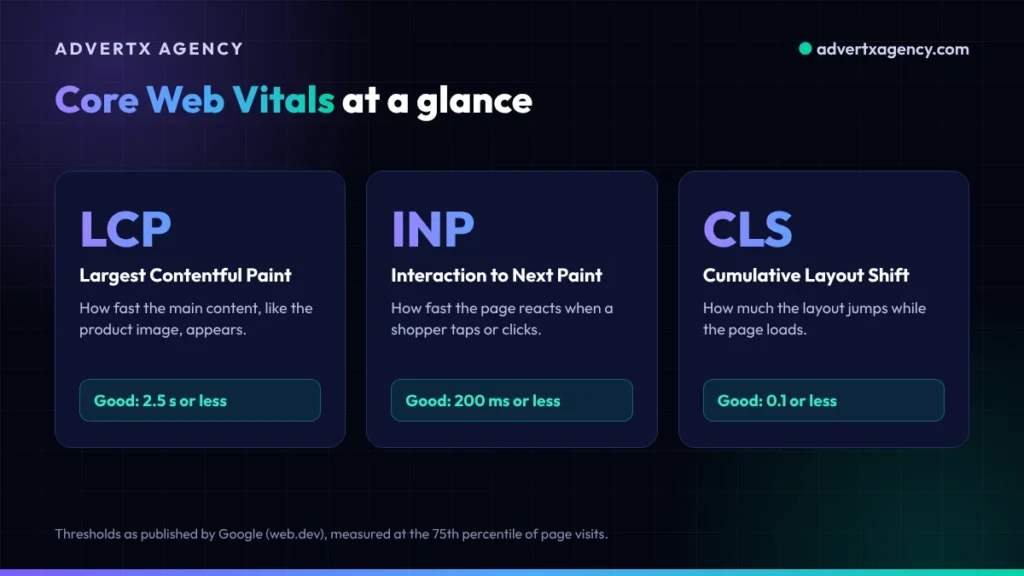
How to Improve PrestaShop Performance
Start by testing important pages with Google PageSpeed Insights. Check your homepage, product pages, and category pages because performance can vary between templates.
Then work on the following improvements:
- Compress product images without reducing their visible quality.
- Use suitable image dimensions for different screen sizes.
- Use modern image formats such as WebP or AVIF where supported.
- Enable caching where supported by your hosting and configuration.
- Review unnecessary modules and remove those you do not need.
- Reduce unused CSS and JavaScript where possible.
- Use a reliable hosting environment.
- Check mobile performance separately from desktop performance.
Do not install multiple optimization modules without testing them. Some tools can conflict with each other or create new performance issues.
Also review third-party scripts such as tracking tools, chat widgets, and advertising scripts. They can affect page performance if they load unnecessary resources.
7. Broken URLs, 404 Errors and Incorrect Redirects
URLs can change when you update product names, reorganize categories, remove products, or redesign your store. If old URLs are not managed properly, customers and search engines may reach pages that no longer exist.
A 404 response means that the requested page cannot be found. Broken internal links can make navigation frustrating and prevent search engines from discovering useful content.
Incorrect redirects can create another problem. For example, sending every deleted product URL to the homepage does not help customers find the item they expected.
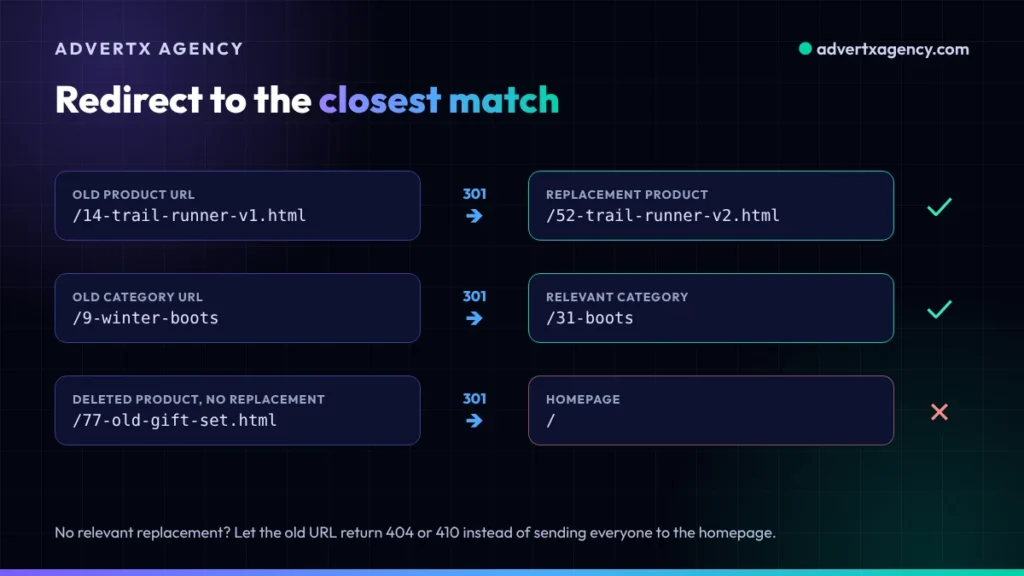
How to Fix URL and Redirect Problems
Use a structured process whenever you change URLs or remove pages.
- Create a list of existing URLs before making changes.
- Identify the new destination for every important old URL.
- Use a permanent 301 redirect when a page has moved permanently.
- Use a temporary redirect when the change is genuinely temporary.
- Update internal links to point directly to the new URLs.
- Remove broken links from navigation and content.
- Avoid unnecessary redirect chains and redirect loops.
- Monitor 404 errors in Google Search Console and website logs.
Not every 404 is automatically an SEO problem. Some deleted pages should remain unavailable if there is no useful replacement. The priority is to fix broken internal links and redirect important old URLs to relevant destinations.
Protect SEO During a PrestaShop Migration
A website migration can affect rankings if URLs, page content, redirects, or technical settings are changed without proper planning.
Before launching the new website, crawl the existing store and save its important URLs. Record important page titles, meta descriptions, canonical tags, and content. Then map old pages to their closest relevant new destinations.
After migration, follow these steps:
- Test redirects from old URLs to their new destinations.
- Check canonical tags on important pages.
- Review robots.txt and indexing settings.
- Generate and submit the updated XML sitemap.
- Check product and category links.
- Test structured data and page templates.
- Monitor indexing, traffic, and search performance.
- Fix unexpected 404 errors and redirect chains.
Do not redirect every old URL to the homepage. If a product has a suitable replacement, redirect to that product. If there is no relevant replacement, use an appropriate not found response.
A careful migration process helps protect existing organic visibility and makes it easier for search engines to understand the new website structure.
8. Weak Internal Linking and Poor Site Structure
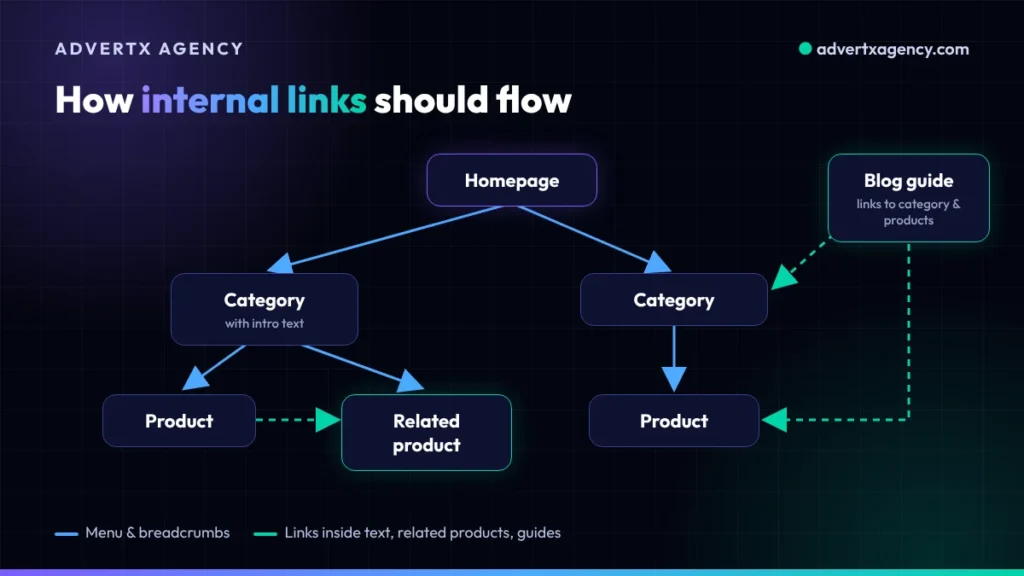
Internal links connect different pages of your website. They help customers move between products and categories while helping search engines discover your content.
A poor website structure can leave important product pages several clicks away from the homepage. Some pages may have very few internal links, while others may receive links that are not relevant to their content.
This makes it harder for search engines and visitors to understand how different parts of your store are connected.
How to Improve Internal Linking in PrestaShop
Create a logical structure that connects your main categories, subcategories, and product pages.
For example, a clothing store could organize its pages like this:
- Homepage
- Men’s Clothing
- Men’s Shoes
- Running Shoes
- Individual Running Shoe Products
Each level should link naturally to relevant pages below it.
You can improve your internal linking strategy by:
- Adding links from category descriptions to important products.
- Connecting related products where it helps customers.
- Linking relevant blog articles to product and category pages.
- Using descriptive anchor text.
- Adding breadcrumb navigation.
- Fixing broken internal links.
- Making sure important pages are accessible through normal navigation.
- Linking to important categories from relevant homepage sections.
Breadcrumbs help visitors understand where they are within your store. They can also help search engines understand relationships between pages when implemented correctly.
Avoid adding links just to increase their number. Every internal link should help users discover useful information or related products.
How PrestaShop SEO Modules Can Help
SEO modules can make store optimization easier by helping manage titles, meta descriptions, redirects, structured data, and other technical settings.
However, installing a module does not automatically improve rankings. You still need a clear SEO strategy and correct configuration.
Before choosing a module, check whether it supports your PrestaShop version, works with your theme, and offers the features your store actually needs.
What to Look for in an SEO Module
A useful module may offer:
- Custom title tags and meta descriptions.
- Friendly URL management.
- Canonical URL settings.
- Redirect management.
- XML sitemap support.
- Structured data options.
- Image SEO features.
- Bulk editing for large product catalogs.
A PrestaShop SEO module should solve a real problem in your store. For example, a large catalog may benefit from bulk metadata editing, while a smaller store may be able to manage its SEO fields manually.
Are Free SEO Modules Enough?
A free SEO module for PrestaShop can be useful when you need basic features or want to test a solution before paying for advanced functionality.
However, check its update history, compatibility, support, and user feedback before installing it. Make sure it does not create duplicate canonical tags, conflicting metadata, or unnecessary redirects.
Avoid using several modules that perform the same task. Overlapping features may create technical conflicts and make your store harder to maintain.
PrestaShop 9 SEO Improvements to Consider
PrestaShop 9 introduces several changes related to URL management, indexing, and image formats. These improvements can help store owners manage technical SEO more effectively, but upgrading alone does not guarantee better rankings.
According to the official PrestaShop 9 release information, the platform includes cleaner product URLs with category names removed by default, an option to omit the default language prefix, redirect options for inactive categories, and changes to filtered product listing pages. It also introduces native WebP and AVIF image support.
If you are planning an upgrade or already using PrestaShop 9, review the following areas.
Review the New Product URL Structure
PrestaShop 9 uses a cleaner product URL structure by default. Category names are removed from product URLs, although the previous behavior can be restored.
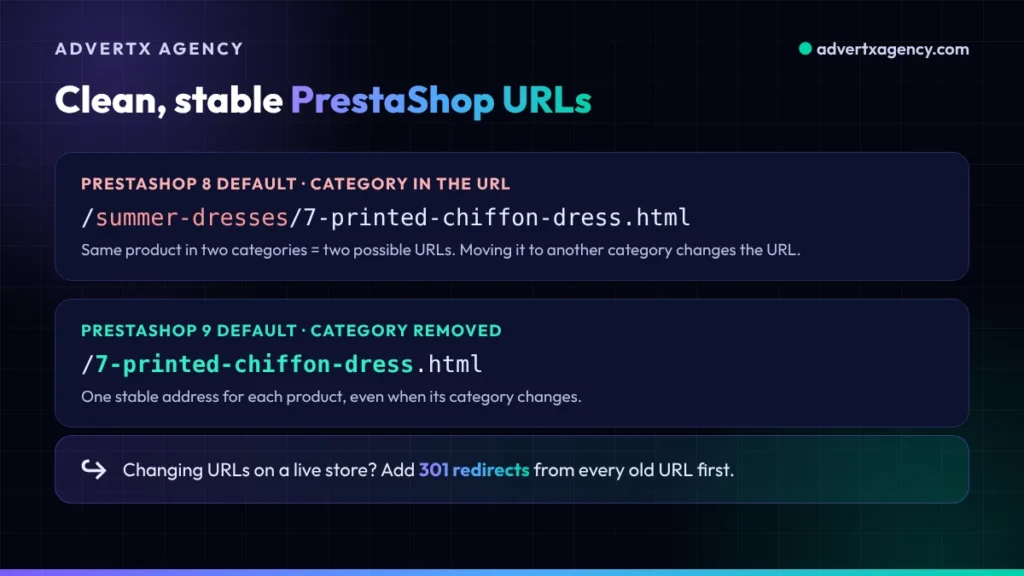
Check the URLs generated for your products after upgrading. Make sure internal links, canonical tags, and redirects use the correct preferred addresses.
Check Language URL Settings
PrestaShop 9 provides an option to omit the default language prefix from URLs.
If your store supports multiple languages, review how language versions are structured. Make sure each version has the correct content, internal links, and language targeting.
Where appropriate, implement hreflang annotations to help search engines understand the relationship between language and regional versions of your pages.
Review Inactive Category Redirects
PrestaShop 9 includes redirect options for inactive categories. Review these settings when removing or reorganizing categories.
Redirect an old category to a relevant replacement when one exists. Avoid sending users to unrelated pages.
Check Filtered Product Listings
PrestaShop 9 includes changes to the indexing behavior of filtered product listing pages. Review how your theme and filtering modules handle these URLs.
Do not assume that every filter combination should be indexed. Valuable search landing pages should have useful, distinct content and a clear URL strategy.
Use Modern Image Formats
Native WebP and AVIF support can help stores deliver modern image formats. However, you should still check image dimensions, compression, loading behavior, and browser compatibility.
Test important pages after upgrading. Theme and module compatibility can affect how SEO elements are displayed and generated.
How to Perform a PrestaShop SEO Audit
An SEO audit helps you understand why your store may not be performing well in search results. It also helps you identify which problems should be fixed first.
A useful audit should cover technical SEO, on-page content, website structure, and performance.
Start with a crawl of your website. This can help identify broken links, duplicate titles, missing descriptions, redirect chains, and pages with technical errors.
Next, review your indexing status in Google Search Console. Check whether important product and category pages are indexed and whether Google reports any crawling or indexing problems.
Technical SEO Audit
Check the following areas:
- Robots.txt and XML sitemap configuration.
- Canonical tags and duplicate URLs.
- HTTP status codes and redirect chains.
- HTTPS and preferred domain consistency.
- Indexing directives and crawl accessibility.
- Filter and pagination URL behavior.
- Server errors and mobile accessibility.
On-Page SEO Audit
Review the content and search information of your important pages:
- Unique title tags and meta descriptions.
- Correct H1, H2, and H3 heading structure.
- Original product and category descriptions.
- Descriptive image alt text.
- Relevant internal links and anchor text.
- Product structured data and visible product information.
International and Multilingual SEO Audit
If your store targets customers in multiple countries or languages, check that each language version has appropriate content and URLs.
Review hreflang annotations, language-specific canonical tags, translated metadata, and internal links. Avoid sending every language version to the same page when separate localized versions exist.
Performance and Search Visibility Audit
Test important pages with Google PageSpeed Insights and monitor Core Web Vitals. Review mobile performance, image loading, scripts, and layout stability.
Also monitor impressions, clicks, indexing changes, and organic traffic through Google Search Console and your analytics platform.
After completing the audit, organize issues by their impact and priority. Fix critical indexing and technical problems first. Then improve important product pages, category content, internal links, and performance.
PrestaShop SEO Checklist
Use this checklist to review the main optimization areas of your online store.
Technical SEO
- Enable and test friendly URLs.
- Check canonical tags on important pages.
- Review duplicate URLs and filter parameters.
- Check robots.txt and noindex directives.
- Submit an accurate XML sitemap.
- Fix broken internal links.
- Set up relevant 301 redirects.
- Review pagination and crawlable links.
- Check HTTPS and preferred domain settings.
On-Page SEO
- Use unique title tags for important pages.
- Write relevant meta descriptions.
- Use one clear H1 on each main page.
- Organize content with descriptive headings.
- Add original product descriptions.
- Improve category page content.
- Optimize product images and alt text.
- Add useful internal links.
- Review product variations and availability information.
Performance and Ecommerce SEO
- Compress images and use suitable formats.
- Improve Core Web Vitals.
- Review unnecessary modules and scripts.
- Add appropriate Product structured data.
- Check product reviews and visible product information.
- Review out-of-stock and discontinued products.
- Check multilingual SEO and hreflang where needed.
- Monitor indexing through Google Search Console.
- Review organic search performance regularly.
Frequently Asked Questions
Is PrestaShop good for SEO?
Yes. PrestaShop provides useful SEO features such as friendly URLs and editable metadata. However, rankings depend on how well your store is configured, the quality of its content, technical performance, and competition in your market.
How can I improve SEO in PrestaShop?
Start by fixing technical problems, optimizing product and category pages, improving internal links, and making your website faster. You should also monitor indexing and search performance regularly.
Does PrestaShop 9 improve SEO automatically?
No platform upgrade can guarantee better rankings. PrestaShop 9 introduces improvements to URL management, filtered listings, redirects, and image format support. You still need to configure your store correctly, maintain useful content, and check theme and module compatibility.
Do I need an SEO module for PrestaShop?
Not necessarily. Many SEO tasks can be handled through the platform’s built-in settings or manual configuration. An SEO module can help with bulk editing and additional features, especially for larger stores.
Why are my PrestaShop products not appearing on Google?
Possible reasons include noindex directives, blocked crawling, incorrect canonical tags, missing internal links, duplicate content, or indexing delays. Check the affected URLs using Google Search Console to identify the actual issue.
How should I handle out-of-stock products?
Keep temporarily unavailable product pages when they still provide useful information. Show their availability clearly and suggest alternatives. For permanently discontinued products, redirect to a relevant replacement when one exists. Otherwise, use an appropriate status code.
How often should I perform a PrestaShop SEO audit?
Review important technical and content issues regularly. A monthly review is a useful starting point for many stores. Larger stores or websites undergoing frequent changes may need more frequent monitoring.
Conclusion
Improving your store’s search visibility requires consistent work. Duplicate content, poor URL management, indexing errors, weak product descriptions, slow pages, and poor internal linking can all limit your organic search performance.
The best approach is to identify the problems affecting your store and fix them in the right order. Start with technical SEO, then improve product and category content, website structure, and page performance.
If you need professional support, our PrestaShop SEO services can help you review your store, identify SEO issues, and build a practical optimization strategy. With the right improvements and regular monitoring, you can create a stronger foundation for long-term organic growth.
